Why Every AI Flyer Looks the Same (And How to Fix Yours)
Why Do All AI Flyers Look the Same?
Quick answer: AI flyers share four giveaways: overloaded layouts, the same popular fonts, overused hand-drawn icons, and brushed edges or circles.
If you scroll Facebook, TikTok, your inbox, or YouTube thumbnails, you have seen this flyer a hundred times. Generative AI learns from graphics that already exist, so it keeps reproducing the same popular looks. The result is a feed full of graphics that seem to come from one designer, and that designer’s name is probably ChatGPT.
This is not an argument of AI versus no AI. Many apps use AI behind the scenes, and plenty of authors are one-person shows who need shortcuts. The point is simple: don’t make your marketing look like everybody else’s.
What Are the Telltale Signs of an AI-Generated Graphic?
1. The graphic is totally overloaded
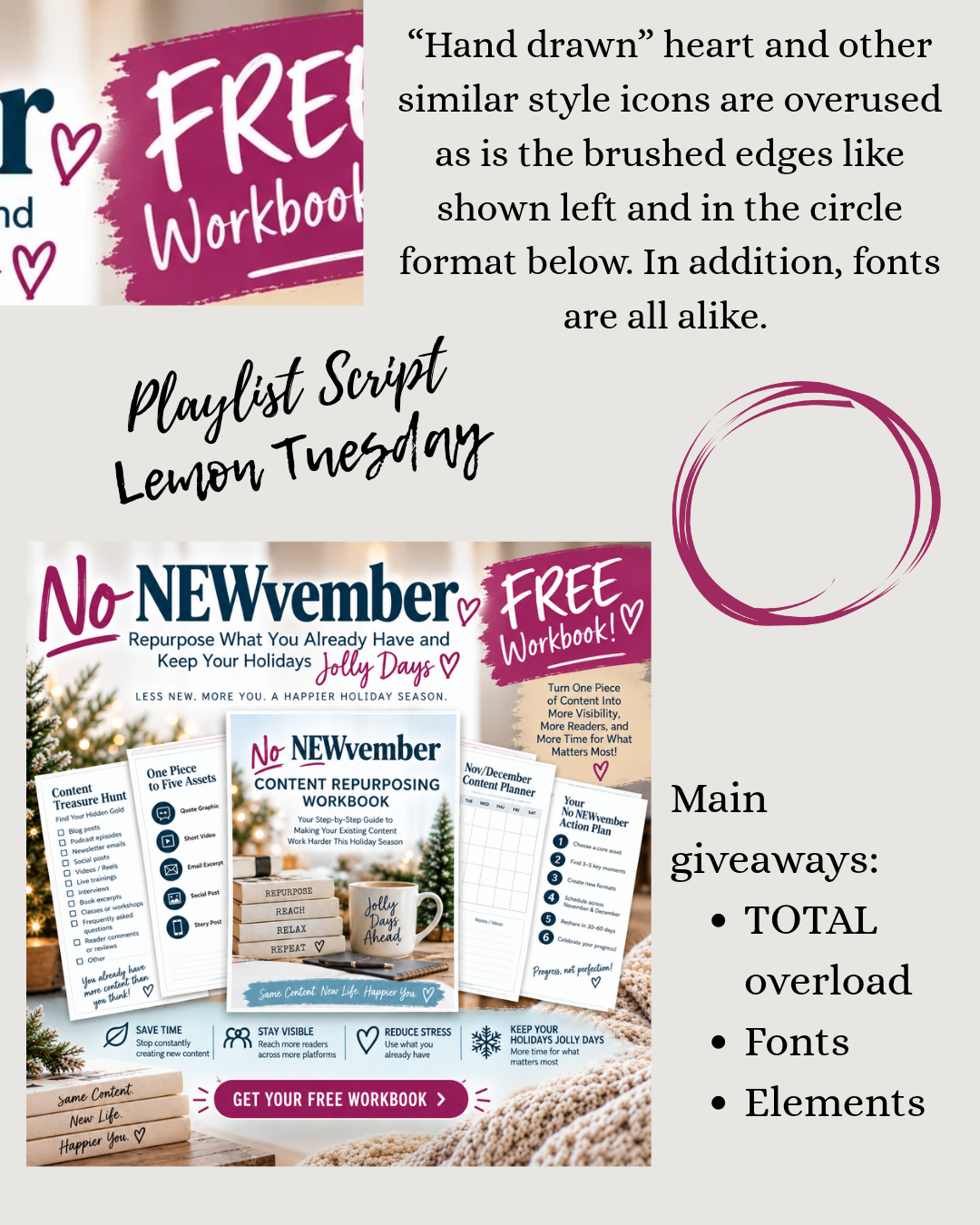
The biggest giveaway is a page stuffed with graphics in every spot, with no white space. Nobody with a design background would layer this much onto one flyer. It looks like someone threw up graphics all over the page.
2. The same fonts show up everywhere
Look for Playlist Script and Lemon Tuesday. Both are popular in Canva, and both are popular in AI output because AI draws on designs already out there. When Rebecca asked ChatGPT which font it used, it said it drew the lettering itself, but the look is clearly inspired by existing flyers. Think of these as the “frequent flyers” of AI graphics.
3. Hand-drawn hearts and icons are overused
AI seems to assume that anything that looks hand-drawn will read as the work of a designer. It doesn’t. Little hearts and similar icons repeated across a design are a strong signal.
4. Brushed paint edges and circles appear again and again
A brush-stroke edge on banners at the top or text at the bottom, plus the same circle shapes, show up on flyer after flyer.
How Can You Make an AI Graphic Look Different?
Add a banner or border and your own information
If you have zero time, at minimum put a banner or border around the graphic. In Rebecca’s example, a simple blue border made it look noticeably less like AI in a feed. Also check the details: her trained ChatGPT left off her logo and name entirely, so add your own information.
Use Canva Magic Layers (Canva Pro)
Drop the graphic into Canva and use Magic Layers to break it into separate pieces. Then delete the extras and rearrange the rest. It works best on graphics that aren’t already badly overloaded, and it can turn into a time-consuming rabbit hole, so add a background around it as well.
Start with a template made by a real designer
Canva templates, free and paid, are made by paid artists. You can also buy inexpensive templates on Etsy, find graphics in Patreon or Skool memberships, or use free templates from artists who give them away so you can add your own creativity.
What Does a Simple, Non-AI-Looking Flyer Look Like?
Rebecca liked the center square of her AI flyer, which looked like a workbook cover. In about four minutes, she asked for a holiday background, cropped the cover from the ChatGPT image, and added her own text: the offer, her event name, and the Authors Allies Round Table.
Frequently Asked Questions
How can you tell if a flyer was made with AI?
Look for an overloaded layout with no white space, the same popular script fonts (such as Playlist Script and Lemon Tuesday), overused hand-drawn hearts and icons, and brushed paint edges and circles.
What is the fastest way to make an AI graphic look different?
Add a banner or border around it and put your own name, logo, and details on it. Even a simple colored edge helps it stand out in a feed.
What is Canva Magic Layers?
It is a Canva Pro feature that splits a flat graphic into separate editable pieces, so you can remove extra elements and rearrange the rest.
Where can I find alternatives to AI-generated graphics?
Try Canva templates (free and paid), inexpensive Etsy templates, memberships on Patreon or Skool, or free templates shared by independent designers.
Is this episode against using AI entirely?
No. The goal is to avoid looking like everyone else, not to ban AI. Rebecca uses AI for certain tasks and shares her AI policy on her websites.
Want help doing this together? If you’re a female writer, join the free Authors Allies Roundtable Skool group. Links are in the show notes.
Listen to the podcast:
If you prefer to read the transcript vs watching the video, here is your chance.